Posted

Sometimes you need someone to police you

Today’s release of Somebody Stop Me, the version 1.3.1 includes new lockdown mode – the block PIN.

Somebody Stop Me Chrome extension logo.

How does the block PIN work?

Ask your friend, partner, spouse, or a child to set a PIN for you. When the PIN is enabled, you cannot disable blocking of specific sites once your daily time limit expires. 
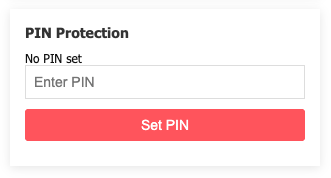
Screenshot of PIN entry form in Somebody Stop Me extension blocking time wasting websites and social media.

Moreover, while you can add more website to block list, you can’t remove any.

Need to do something important despite the block? You still can, but now you have to ask that person to enter the PIN. Go on, explain to your wife why wasting another hour on Twitter/X is really important.

Jarek Rozanski
Jarek Rozanski
@jarek@its23.eu

Hi, I am Jarek, a seasoned Software Engineer with extensive experience in developing complex systems like search engines, web applications, and electronic trading platforms. I currently run my own consulting firm, Input Objects, and privacy-first web analytics, Wide Angle Analytics. When acting as a Functional Programmer, I primarily code in Scala but also have a strong interest in OCaml and F#. On a daily basis, I use various programming languages, including Java, C#, JavaScript, TypeScript, and Go.

This account is attached to my WordPress instance. My main Mastodon account is @jarekrozanski@mastodon.social

37 posts
7 followers
Fediverse reactions