
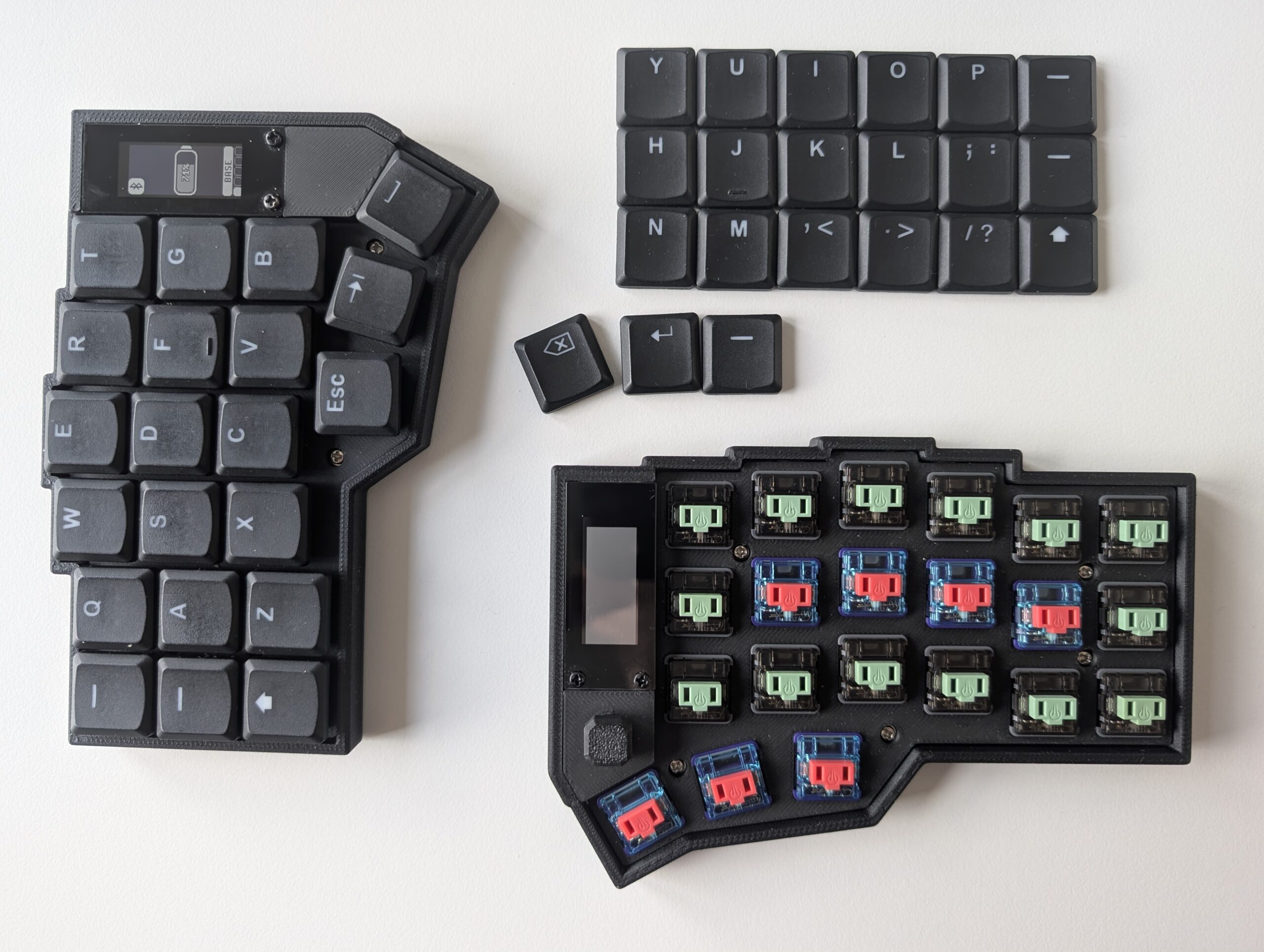
Using Home Row mods was always a challenge for me. When trying Home Row Mods on QMK-based keyboards, the problem was always timing and chords. Sadly, chords are an all-or-nothing feature unless you invest in building custom functions in the firmware, something I have yet to get into.
However, the story on ZMK keyboards is very different. The behaviours in ZMK allow for greater flexibility with keyboard setup, albeit with increased complexity, at least for those just starting out.
Equipped with a new Corne-J/Eyelash from PandaKB, I set out to finally master using Home Row mods. The promise of improved ergonomics was all too alluring.
The behaviour:
// LEFT                        JOYSTICK           RIGHT
// 0  1  2  3  4  5               6               7  8  9  10 11 12
// 13 14 15 16 17 18           19 20 21           22 23 24 25 26 27
// 28 29 30 31 32 33           34 35              36 37 38 39 40 41
//          41 42 43                              44 45 46

// Home row mods — hold triggers only when a key on the OPPOSITE half is pressed
hml: homerow_mods_left {
	compatible = "zmk,behavior-hold-tap";
	#binding-cells = <2>;
	flavor = "balanced";
	tapping-term-ms = <220>;
	quick-tap-ms = <150>;
	require-prior-idle-ms = <120>;
	bindings = <&kp>, <&kp>;
	hold-trigger-key-positions = <7 8 9 10 11 12 22 23 24 25 26 27 36 37 38 39 40 41 44 45 46>;
	hold-trigger-on-release;
};

hmr: homerow_mods_right {
	compatible = "zmk,behavior-hold-tap";
	#binding-cells = <2>;
	flavor = "balanced";
	tapping-term-ms = <220>;
	quick-tap-ms = <150>;
	require-prior-idle-ms = <120>;
	bindings = <&kp>, <&kp>;
	hold-trigger-key-positions = <0 1 2 3 4 5 13 14 15 16 17 18 28 29 30 31 32 33 41 42 43>;
	hold-trigger-on-release;
};
Nothing fancy. The above approach follows standard ZMK guidelines. But unlike QMK, this behaviour can be applied only to select keys, the Home Row mods. For Layer Toggle, I can keep the other config, which uses a hold-preferred behaviour on the thumb cluster.
< {
quick-tap-ms = <200>;
tapping-term-ms = <150>;
flavor = "hold-preferred";
};
The last obstacle was accidental presses. I know that the split keyboard community raves about Sunset Choc V1 switches, but I personally cannot stand them for longer typing or programming sessions. Not to mention that, together with Red Pro or Choc Browns, they share the same LEGO-like sound (I love how EIGA appropriately captured this in his video).
So the only options for me were either Twilight or Bokeh silent switches. And silent they are. They are smooth and pillowy, only a tad scratchy, but untrained ears will not pick it up.
The problem?
Twilight switches are too light for Home Row mods. With Twilights, it is impossible for me to keep my fingers hovering over the home row without accidental activations.
At the same time, Bokeh switches, being heavier, prevent activation, but they put a bit too much effort on my pinkies and others.
The solution is simple. I put Bokeh switches on the keys where I park my fingers. Everything else is Twilight for smooth, easy presses.

And thus, the perfect keyboard is born. For me, at least. For now.