

I was a huge fan of #Miryoku. It feels so ergonomic and logical that I “mastered” it in a matter of minutes.
But Miryoku has a fatal flaw. Using Modifier + Letter/Number + Nav button is impossible without very custom mappings.
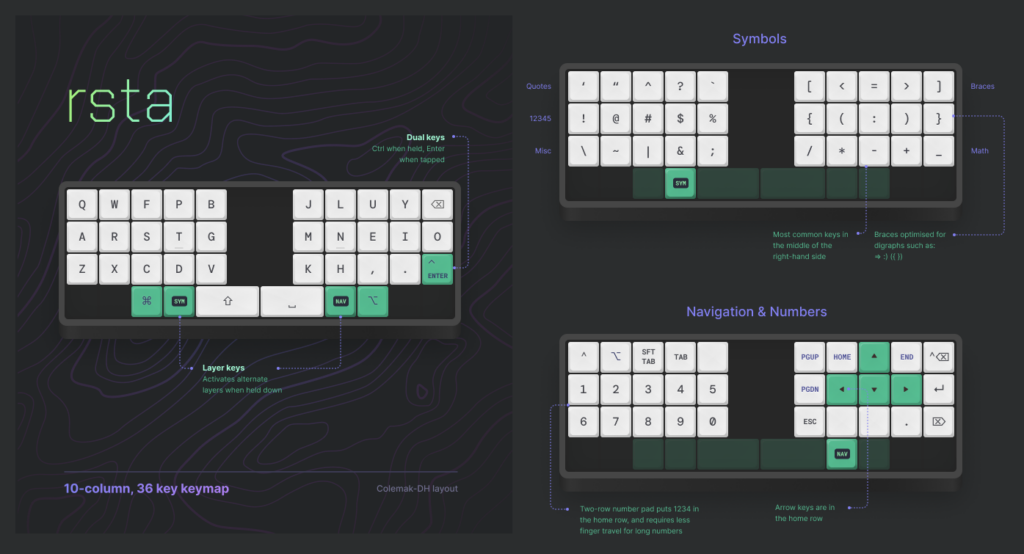
I am trialling a slightly modified RSTA layout on a 3w6 #ergokeyboard starting. It does everything but feels less ergonomic.
Pros:
- No home-row mods;
- fewer misfires.
- So far every combination is reachable.
Cons:
- No Home Row Mods;
- once you master Home Row Mods and learn to respect the delay, they become like pure magic, and you wonder how you could have lived without them.
- Position of Ctrl, Enter and Backspace makes it a pinky heavy layout
- this I will have to tweak as an appeal of smaller ergonomic keyboards is focus on thumbs, rather than on the pinky.
The ergo-journey continues.